Internet-Enabled RTPS
Overview
Like any specification, standard, or system, RTPS was designed with certain assumptions. Two of these assumptions severely limit the ability to use RTPS in modern network environments. First, RTPS, or more specifically, SPDP may use multicast for discovery. Multicast is not supported on the public Internet which precludes the use of RTPS for Internet of Things (IoT) applications and Industrial Internet of Things (IIoT) applications. Second, SPDP and SEDP advertise locators (IP and port pairs) for endpoints (DDS readers and writer). If the participant is behind a firewall that performs network address translation, then the locators advertised by the participant are useless to participants on the public side of the firewall.
This section describes different tools and techniques for getting around these limitations. First, we introduce the RtpsRelay as a service for forwarding RTPS messages according to application-defined groups. The RtpsRelay can be used to connect participants that are deployed in environments that don’t support multicast and whose packets are subject to NAT. Second, we introduce Interactive Connection Establishment (ICE) for RTPS. Adding ICE to RTPS is an optimization that allows participants that are behind firewalls that perform NAT to exchange messages directly. ICE requires a backchannel for distributing discovery information and is typically used with the RtpsRelay.
The RtpsRelay
The RtpsRelay is designed to allow participants to exchange RTPS datagrams when separated by a firewall that performs network address translation (NAT) and/or a network that does not support multicast like the public Internet. The RtpsRelay supports both IPv4 and IPv6. A participant that uses an RtpsRelay Instance is a client of that instance.
Each RtpsRelay instance contains two participants: the Application Participant and the Relay Participant. The Application Participant runs in the domain of the application. The RtpsRelay reads the built-in topics to discover Participants, DataReaders, and DataWriters. It then shares this information with other RtpsRelay instances using the Relay Participant.
Each RtpsRelay instance maintains a map of associated readers and writers. When a client sends an RTPS datagram to its RtpsRelay instance, the RtpsRelay instance uses the association table to forward the datagram to other clients and other RtpsRelay instances so that they can deliver it to their clients. Clients send RTPS datagrams via unicast which is generally supported and compatible with NAT. The RtpsRelay can be used in lieu of – or in addition to – conventional RTPS discovery.
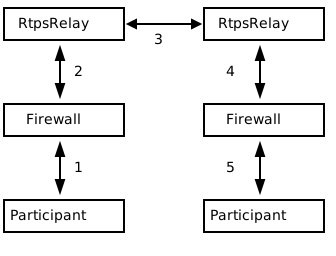
The preceding diagram illustrates how the RtpsRelay can be used to connect participants that are behind firewalls that may be performing NAT. First, a Participant sends an RTPS datagram to its associated RtpsRelay (1). This datagram is intercepted by the firewall, the source address and port are replaced by the external IP address and port of the firewall, and then the datagram is sent to the RtpsRelay (2). The relationship between the source address and external IP address and port selected by the firewall is called a NAT binding. The RtpsRelay instance forwards the datagram to other RtpsRelay instances (3). The RtpsRelays then forward the datagram to all of the destination participants (4). Firewalls on the path to the participants intercept the packet and replace the destination address (which is the external IP and port of the firewall) with the address of the Participant according to a previously created NAT binding (5).
The RTPS implementation in OpenDDS uses a port for SPDP, a port for SEDP, and a port for non-discovery RTPS messages. The RtpsRelay mirrors this idea and exposes three ports, each dedicated to handling one type of traffic.
To keep NAT bindings alive, clients send STUN binding requests and indications periodically to the RtpsRelay ports. Participants using ICE may use these ports as a STUN server for determining a server reflexive address. The timing parameters for the periodic messages are controlled via the ICE configuration variables for server reflexive addresses.
Using the RtpsRelay
Support for the RtpsRelay is activated via configuration.
See [rtps_discovery] and [transport] (rtps_udp) for details.
As an example:
[common]
DCPSGlobalTransportConfig=$file

[domain/4]
DiscoveryConfig=rtps

[rtps_discovery/rtps]
SpdpRtpsRelayAddress=1.2.3.4:4444
SedpRtpsRelayAddress=1.2.3.4:4445
UseRtpsRelay=1

[transport/the_rtps_transport]
transport_type=rtps_udp
DataRtpsRelayAddress=1.2.3.4:4446
UseRtpsRelay=1
Each participant should use a single RtpsRelay instance due to the way NAT bindings work. Most firewalls will only forward packets received from the destination address that was originally used to create the NAT binding. That is, if participant A is interacting with relay 1 and participant B is interacting with relay 2, then a message from participant A to participant B must go from participant A to relay 1, to relay 2, and finally to participant B. Relay 1 cannot send directly to B since that packet will not be accepted by the firewall.
Usage
The RtpsRelay itself is an OpenDDS application.
The source code is located in tools/rtpsrelay and tools/dds/rtpsrelaylib.
DDS Security must be enabled to build the RtpsRelay.
See Building OpenDDS with Security Enabled.
Each RtpsRelay process has a set of ports for exchanging RTPS messages with the participants called the “vertical” ports and a set of ports for exchanging RTPS messages with other relays called the “horizontal” ports.
The RtpsRelay contains an embedded web server called the meta discovery server.
The listening address can be set using -MetaDiscoveryAddress and logging can be enabled using -LogHttp.
The web server has the following endpoints:
/configResponds with configured content and content type. See
-MetaDiscoveryContentPathand-MetaDiscoveryContentbelow. Potential client participants can download the necessary configuration from this endpoint./healthcheckResponds with HTTP 200 (OK) or 503 (Service Unavailable) if
thread monitoring is enabledand the RtpsRelay is not admitting new client participants. See-UtilizationLimit,-AdmissionControlQueueSize, and-AdmissionControlQueueDurationfor more information. Load balancers can use this endpoint to route new client participants to an available RtpsRelay instance.
The command-line options for the RtpsRelay:
- -Id <string>
This option is mandatory and is a unique id associated with all topics published by the relay.
- -HorizontalAddress <address>
Determines the base network address used for receiving RTPS message from other relays. By default, the relay listens on the first IP network interface and uses port
11444for SPDP messages,11445for SEDP messages, and11446for data messages.
- -VerticalAddress <address>
Determines the base network address used for receiving RTPS messages from the participants. By default, the relay listens on
0.0.0.0:4444for SPDP messages,0.0.0.0:4445for SEDP messages, and0.0.0.0.4446for data messages.
- -RelayDomain <domain>
Sets the DDS domain used by the Relay Participant. The default is 0.
- -ApplicationDomain <domain>
Sets the DDS domain used by the Application Participant. The default is 1.
- -UserData <string>
Set the contents of the Application Participant’s UserData QoS policy to the provided string.
- -BufferSize <integer>
Size of send and receive buffers in bytes
- -Lifespan <seconds>
Config store key:
RTPS_RELAY_LIFESPANRtpsRelay will only forward a datagram to a client if it has received a datagram from the client in this amount of time. Otherwise, participant is marked as not alive. The default is 60 seconds.
- -InactivePeriod <seconds>
Config store key:
RTPS_RELAY_INACTIVE_PERIODRtpsRelay will mark participant as not active if does not receive a datagram from the client in this amount of time. The default is 60 seconds.
- -AllowEmptyPartition 0|1
Allow client participants with no partitions. Defaults to 1 (true).
- -IdentityCA <path>
Provide identity CA file for DDS Security.
- -PermissionsCA <path>
Provide permissions CA file for DDS Security.
- -IdentityCertificate <path>
Provide identity certificate file for DDS Security.
- -IdentityKey <path>
Provide identity key file for DDS Security.
- -Governance <path>
Provide governance file for DDS Security.
- -Permissions <path>
Provide permissions file for DDS Security.
- -RestartDetection 0|1
Setting to 1 causes the relay to track clients by the first 6 bytes of their RTPS GUID and source IP address and clean up older sessions with the same key. The default is 0 (false).
- -LogWarnings 0|1
Config store key:
RTPS_RELAY_LOG_WARNINGSEnable/disable logging of warning events.
- -LogDiscovery 0|1
Config store key:
RTPS_RELAY_LOG_DISCOVERYEnable/disable logging of discovery events.
- -LogActivity 0|1
Config store key:
RTPS_RELAY_LOG_ACTIVITYEnable/disable logging of activity events.
- -LogHttp 0|1
Config store key:
RTPS_RELAY_LOG_HTTPEnable/disable logging in the meta discovery HTTP server.
- -LogUtilizationChanges 0|1
Config store key:
RTPS_RELAY_LOG_UTILIZATION_CHANGESEnable/disable logging of thread utilization changes that exceed a certain threshhold.
- -LogRelayStatistics <seconds>
Config store key:
RTPS_RELAY_LOG_RELAY_STATISTICS
- -LogHandlerStatistics <seconds>
Config store key:
RTPS_RELAY_LOG_HANDLER_STATISTICSWrite statistics for the various event types to the log at the given interval, defaults to 0 (disabled).
- -PublishRelayStatistics <seconds>
Config store key:
RTPS_RELAY_PUBLISH_RELAY_STATISTICS
- -PublishHandlerStatistics <seconds>
Config store key:
RTPS_RELAY_PUBLISH_HANDLER_STATISTICSConfigure the relay to publish usage statistics on DDS topics at the given interval, defaults to 0 (disabled).
- -LogThreadStatus 0|1
Config store key:
RTPS_RELAY_LOG_THREAD_STATUSIf
thread monitoring is enabled, log the status of the threads in the RtpsRelay, defaults to 0 (disabled).
- -ThreadStatusSafetyFactor <integer>
Config store key:
RTPS_RELAY_THREAD_STATUS_SAFETY_FACTORRestart if
thread monitoring is enabledand a thread has not checked in for this many reporting intervals, default 3.
- -UtilizationLimit <decimal>
Config store key:
RTPS_RELAY_UTILIZATION_LIMITIf
thread monitoring is enabled, the RtpsRelay will not accept new client participants if the CPU utilization of any thread is above this limit, default .95.
- -AdmissionControlQueueSize <count>
Config store key:
RTPS_RELAY_ADMISSION_CONTROL_QUEUE_SIZEThe max number of new client participants that are allowed to perform discovery. If the admission control queue is full, then new client participants are not admitted. Default is 0 (disabled).
- -AdmissionControlQueueDuration <seconds>
Config store key:
RTPS_RELAY_ADMISSION_CONTROL_QUEUE_DURATIONNew client participants in the
admission control queuethat are taking longer than this many seconds to perform discovery are removed from the queue. Default is 0.
- -AdmissionMaxParticipantsRange <low>-<high>
Config store key:
RTPS_RELAY_MAX_PARTICIPANTS_LOW_WATER,RTPS_RELAY_MAX_PARTICIPANTS_HIGH_WATERIf this option is used, the relay’s “admitting” state will be set to false when the number of active participants reaches the <high> value. After the number of active participants falls below the <low> value, this metric will cease to cause the “admitting” state to be false, although it may remain false due to other controls.
- -PublishRelayStatus <seconds>
Config store key:
RTPS_RELAY_PUBLISH_RELAY_STATUSSetting this to a positive integer causes the relay to publish its status at that interval.
- -PublishRelayStatusLiveliness <seconds>
Config store key:
RTPS_RELAY_PUBLISH_RELAY_STATUS_LIVELINESSSetting this to a positive integer causes the relay to set the Liveliness QoS on the relay status topic.
- -MetaDiscoveryAddress <host>:<port>
Listening address for the meta discovery HTTP server, default is
0.0.0.0:8080.
- -MetaDiscoveryContentType <content-type>
The HTTP content type to report for the meta discovery HTTP server
/configendpoint, default isapplication/json.
- -MetaDiscoveryContentPath <path>
- -MetaDiscoveryContent <content>
The content returned by the meta discovery HTTP server
/configendpoint, default is{}. If a path is specified, the content of the file will be used.
- -MaxIpsPerClient <integer>
The maximum number of IP addresses that the RtpsRelay will maintain for a client participant, defaults to 0 (infinite).
- -RejectedAddressDuration <seconds>
Amount of time to reject messages from client participants that show suspicious behavior, e.g., those that send messages from the RtpsRelay back to the RtpsRelay. The default is 0 (disabled).
- -HandlerThreads <threads>
Use a thread pool with this many threads (default 1) to handle input/output/timer events.
- -SynchronousOutput 0|1
Send messages immediately, defaults to 0 (disabled).
- -DrainInterval <seconds>
Config store key:
RTPS_RELAY_DRAIN_INTERVALInitial value for the client draining rate. Draining will not start until enabled by a command sent from RtpsRelayControl.
- -DeniedPartitionsTimeout <seconds>
Config store key:
RTPS_RELAY_DENIED_PARTITIONS_TIMEOUTExpected amount of time a denied partition will remain in the denied partitions list before being cleaned up. The default is 900 seconds.
RtpsRelayControl
The RtpsRelayControl application’s source code is located in tools/rtpsrelay/control.
It is an OpenDDS application that interacts with the RtpsRelay using the topics
Relay Config Status and Relay Config Control.
RtpsRelayControl is a command-line application that passes its argument vector to the OpenDDS
DomainParticipantFactory. Therefore options like -DCPSConfigFile are all supported.
In most cases, the same config file used for the RtpsRelay can be used for RtpsRelayControl.
If a different config file is desired, it must configure the Relay Domain with compatible discovery
and transport options.
The command-line options specific to RtpsRelayControl are:
- -Domain <integer>
Sets the DDS domain used to communicate with the
RtpsRelay. The default is 0.
- -RelayId <string>
Sets the unique ID for the
RtpsRelayinstance that will be controlled. The default is the empty string, in which case no-Setoptions may be used but the current configuration of all discovered instances is shown.
- -Set <string>
This option may be specified multiple times. The argument is
NAME=valuedesignating a configuration parameter to change in theRtpsRelay.RtpsRelayControlwill send thoes changes to theRtpsRelayvia itsRelay Config Controltopic and run until the desired changes are acknowledged by theRtpsRelayvia itsRelay Config Statustopic.
- -ShowAll
If specified, all configuration parameters sent by the
RtpsRelayonRelay Config Statusare written to standard output in JSON format. The default is to output only configuration parameters that begin withRTPS_RELAY, omitting those parameters that are internal to OpenDDS.
- -KeepRunning
If specified, the
RtpsRelayControlprocess will keep running until terminated by the user. This is also the behavior when there is no specified-RelayId. Then default (when run with-RelayId) is to exit the process when requested settings are complete.
Parameters that may be dynamically configured in the RtpsRelay include:
RTPS_RELAY_DRAIN_INTERVALset to an integer number of milliseconds to change the-DrainInterval.RTPS_RELAY_DRAIN_STATEset to eitherNormalorDraining. WhenDrainingthe RtpsRelay will, one client at a time, stop responding to STUN requests from that client. Clients should monitor STUN responses using the OpenDDSConnectionRecord Topic and find a new relay instance when STUN responses cease.RTPS_RELAY_ADMIT_STATEset to eitherNormalorNotAdmitting. In most cases users will want an instance that isDrainingto also beNotAdmittingin order to prevent new clients from associating.Any of the command-line options listed with a “Config store key” in Usage
Many of the configuration properties in Run-time Configuration listed with a “Config store key”
Deployment Considerations
Running an RtpsRelay relay cluster with RTPS in the cloud leads to a bootstrapping problem since multicast is not supported in the cloud. One option is to not use RTPS for discovery. Another option is to run a single well-known relay that allows the other relays to discover each other. A third option is to use a program translates multicast to unicast.
RTPS uses UDP which typically cannot be load balanced effectively due to the way NAT bindings work. Consequently, each RtpsRelay server must have a public IP address. Load balancing can be achieved by having the participants choose a relay according to a load balancing policy. To support this usage, the RtpsRelay includes a web server which can be configured to serve the public IP address of the relay. These web server ports would be exposed via a centralized load balancer. A participant, then, could access the HTTP load balancer to select a relay.
Interactive Connectivity Establishment (ICE) for RTPS
Interactive Connectivity Establishment (ICE) is protocol for establishing connectivity between a pair of hosts that are separated by at least one firewall that performs network address translation. ICE can be thought of as an optimization for situations that require an RtpsRelay. The success of ICE depends on the firewall(s) that separate the hosts.
The ICE protocol has three steps. First, a host determines its public IP address by sending a STUN binding request to a public STUN server. The STUN server sends a binding success response that contains the source address of the request. If the host has a public IP address, then the address returned by STUN will match the IP address of the host. Otherwise, the address will be the public address of the outermost firewall. Second, the hosts generate and exchange candidates (which includes the public IP address determined in the first step) using a side channel. A candidate is an IP and port that responds to STUN messages and sends datagrams. Third, the hosts send STUN binding requests to the candidates in an attempt to generate the necessary NAT bindings and establish connectivity.
For OpenDDS, ICE can be used to potentially establish connectivity between SPDP endpoints, SEDP endpoints, and ordinary RTPS endpoints. SPDP is used as the side channel for SEDP and SEDP is used as the side channel for the ordinary RTPS endpoints. To this, we added two parameters to the RTPS protocol for sending general ICE information and ICE candidates and added the ability to execute the ICE protocol and process STUN messages to the RTPS transports.
ICE is defined in RFC 8445. ICE utilizes the STUN protocol that is defined in RFC 5389. The ICE implementation in OpenDDS does not use TURN servers.
ICE is enabled through configuration.
The minimum configuration involves setting the [rtps_discovery] UseIce and [transport] UseIce (rtps_udp) flags and providing addresses for the STUN servers.
See [rtps_discovery] and [transport] (rtps_udp) for details.
[common]
DCPSGlobalTransportConfig=$file
DCPSDefaultDiscovery=DEFAULT_RTPS

[transport/the_rtps_transport]
transport_type=rtps_udp
DataRtpsRelayAddress=5.6.7.8:4446
UseIce=1
DataStunServerAddress=1.2.3.4:3478

[domain/42]
DiscoveryConfig=DiscoveryConfig1

[rtps_discovery/DiscoveryConfig1]
SpdpRtpsRelayAddress=5.6.7.8:4444
SedpRtpsRelayAddress=5.6.7.8:4445
UseIce=1
SedpStunServerAddress=1.2.3.4:3478
Security Considerations
The purpose of this section is to inform users about potential security issues when using OpenDDS. Users of OpenDDS are encouraged to perform threat modeling, security reviews, assessments, testing, etc. to ensure that their applications meet their security objectives.
Use DDS Security
Most applications have common objectives with respect to data security:
Authentication - The identity of every process that participates in the DDS domain can be established.
Authorization - Only authorized writers of a topic may generate samples for a topic and only authorized readers may consume samples for a topic.
Integrity - The content of a sample cannot be altered without detection.
Privacy - The content of a sample cannot be read by an unauthorized third party.
If an application is subject to any of these security objectives, then it should use the DDS Security features described in DDS Security. Using a non-secure discovery mechanism or a non-secure transport leaves the application exposed to data security breaches.
Understand the Weaknesses of (Secure) RTPS Discovery
Secure RTPS Discovery has a behavior that can be exploited to launch a denial of service attack (see CISA advisory icsa-21-315-02). Basically, an attacker can send a fake SPDP message to a secure participant which will cause it to begin authentication with a non-existent participant. The authentication messages are repeated resulting in amplification. An attacker could manipulate a group of secure participants to launch a denial of service attack against a specific host or group of hosts. RTPS (without security) has the same vulnerability except that messages come from the other built-in endpoints. For this reason, consider the mitigation features below before making an OpenDDS participant publicly accessible.
The weakness in RTPS Discovery can be mitigated but currently does not have a solution. OpenDDS includes the following features for mitigation:
Compare the source IP of the SPDP message to the locators. For most applications, the locators advertised by SPDP should match the source IP of the SPDP message.
Use the participant lease time from secure discovery and bound it otherwise. By default, OpenDDS will attempt authentication for the participant lease duration specified in the SPDP message. However, this data can’t be trusted so a smaller maximum lease time can be specified to force authentication or discovery to terminate before the lease time.
Limit the number of outstanding secure discoveries. The number of discovered but not-yet-authenticated participants is capped when using secure discovery.
Run Participants in a Secure Network
One approach to a secure application without DDS Security is to secure it at the network layer instead of the application layer. A physically secure network satisfies this by construction. Another approach is to use a virtual private network (VPN) or a secure overlay. These approaches have a simple security model when compared to DDS Security and are not interoperable.